 |
|
|
|
 |
 |
With gameSpace, there's no need to pay for texture-making software!
|
gameSpace contains everything you need to make textures to use in your games, including amazingly powerful procedural shaders that will have you producing rock, mud, leaves, grass, bricks, wood and more!
|
| The most basic form of making a texture is very straightforward. Create a plane or cube, paint with the procedural material you are interested in, and render from directly above.
You have much more power than found in a regular
texture making application though, as you can introduce
bump mapping and lighting effects! These let you give even
simple textures an edge over other applications, creating
effects and control that would be difficult or impossible
to achieve outside
of a 3D application!
|
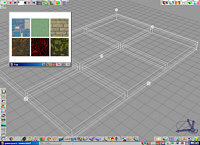
Rendering out 6 textures at once (click for larger image) |
|
The next step is to introduce geometry!
|
|
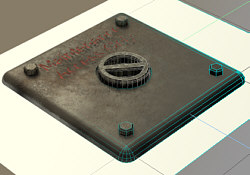 Although creating textures by using procedural shaders is already awesomely powerful, you can take it much further than that! Here is a question, do not be offended - how good a 2D artist are you really? Although creating textures by using procedural shaders is already awesomely powerful, you can take it much further than that! Here is a question, do not be offended - how good a 2D artist are you really?
Chances are, you are competent, but if it came to painting shadows, and nuts and bolts, and rust patterns, and other details.... it would be very hard to get it looking right!
With a few simple objects, though, it is possible to create a very realistic looking texture in gameSpace, like this maintenance panel, textured using procedural
shaders, but also with geometry to model the handle and the bolts.
|
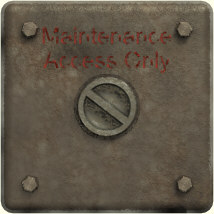 When you render this out, you get the result on the right. Now, I do not know about your artistic skills in a 2D package, but I know it would have been impossible for me to draw this! That is why the question, how good are you in 2D really? When you render this out, you get the result on the right. Now, I do not know about your artistic skills in a 2D package, but I know it would have been impossible for me to draw this! That is why the question, how good are you in 2D really?
Building it in 3D was easy. Not only that, but now I have bolts, a metal plate, a handle, lighting and textures that I can reuse to make new textures in future. You do not usually get that sort of re-usability in a 2D application! |
|
Taking geometry for making texture maps even further
|
Taking the geometry modeling approach even further, here is a drinks machine, modeled in gameSpace. It has been textured using texture maps, procedural shaders, glass, etc. More importantly, it also has geometry for things like the drinks cans inside, for the buttons outside, and even the coin slot!
It is so much easier to build this than it would be to paint it by hand in a 2D paint package, and you can also "bake in" effects like shiny edges, or shadows.
|
The final result
|
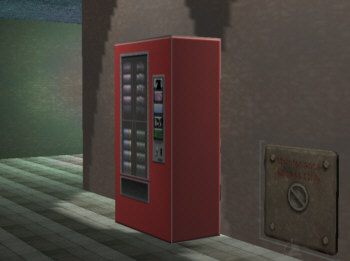 Now we can take the results from earlier and incorporate them into a realtime scene. Now we can take the results from earlier and incorporate them into a realtime scene.
Here the walls are textured with a texture made from a Simbiont 'rusty' texture. Then we take a cube and paint it with our drinks machine textures, and presto, instant refreshment!
Finally, for the access panel, one face from the original object was taken and extruded, to preserve the round corners, then the texture of the rendered object applied... it all looks very effective! |
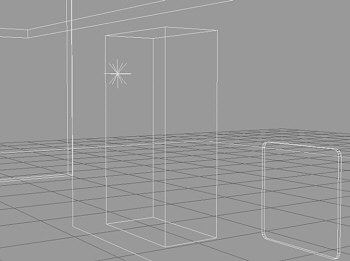 Here is the wireframe, that shows just how simple your objects can be once you texture them in this way. The total face count for this scene - 44!
If we were to use the original panel and drinks machine objects, rather than just their rendered likeness? Then the polygon count in this scene would be over 3563!
Of course, you could spend more time in order to make your textures even more detailed and realistic, but this shows just how effective gameSpace can be not just for making 3D content, but for 2D content also! |
|
|
若是您希望進一步瞭解 gameSpace 的功能,請 E-Mail:
dgsupport@digivision.com.tw
總代理:仕冶資訊股份有限公司 DigiVision Corporation
http://www.digivision.com.tw |
|
|
 |










